How To Create Bronze Age Addresses And Send Transactions
Learn how to create Bronze Age addresses from your node, and how to send transactions from those addresses once created.
A Quai-native wallet is under active development, which will allow users to create addresses and send transactions without running a node. For the time being, however, here are the steps to create an address and send a transaction on Quai Network after you have completed your node setup.
This is the second article in a three-part series detailing how to get involved with Quai Network’s Bronze Age Testnet. In order to create addresses and send transactions at this point in the Bronze Age, you must have completed the first part of the series, titled “How to Set Up and Maintain Your Bronze Age Quai Node.” If you have not completed this step, please do so before beginning this tutorial. If you would prefer to learn this information in video format, you can check out a video of our team member setting up addresses on our YouTube channel.
Step 1: start your node
Learn how to set up a Quai Network node here:
Once your node is running, you’re ready to get into the console.
Step 2: attach to javascript console
In this step, we will enter the JavaScript Console.
The command to enter the JavaScript Console alters slightly between Mac and Windows users. On both Mac and Windows, however, you will choose within the command which chain you would like to open the Console for. You can choose any of Quai’s 13 chains. This selection will determine which chain your address is created on. In this example, I chose to use the “Paxos” chain, or Region 2.
For Mac users, the command to enter the Console in the Paxos chain would be:
./build/bin/quai attach ~/Library/Quai/region2/geth.ipc
For Windows users, the command to enter the Console in the Paxos Chain would be:
./build/bin/quai attach /home/your_username/.quai/region2/geth.ipc
You should now be welcomed the Geth JavaScript Console.

Step 3: Make your bronze age address(es)
It is important to emphasize that this process will only make an address for the chain on which you entered the Console. In my example using the Paxos chain, I am making an address on Paxos. While all Quai addresses can interact with each other, it is important for miners to make unique addresses for each chain they mine. The Quai yields of mining will be sent to these addresses after we connect them later on.
To make an Bronze Age address for the chain that we’re on in the JavaScript Console, run the following command:
personal.newAccount()
You will be prompted to create a passphrase. If you wish to do so, you can enter and confirm the passphrase here. If you do not wish to have a passphrase, you can simply hit enter twice to get your address.
step 4: become familiar with the javascript console
There are many handy commands within the JavaScript Console that can be useful to know while interacting with Quai Network. Some are outlined below.
To see all Bronze Age addresses we have generated within the chain we are using the Console on, we can use the following:
personal.listAccounts
To check an address balance, use the following:
eth.getBalance("PASTE_ADDRESS_HERE")
Your balance will be zero until you have mined to this address, or received Quai from another account.
Sending transactions will require additional commands, which will be addressed later.
Step 5: Input Bronze age addresses for miner
This step is important not only for miners, but also for anyone looking to send transactions on Quai. In this step, we will alter the network.env file, which is where your coinbase addresses are held. The coinbase addresses are the addresses that will receive Quai as block rewards for mining.
To enter the network.env file, run the following command within the go-quai directory:
nano network.env
You will be entered into a matrix-like window where you can edit many settings. The only ones we will be focused on are the Coinbase addresses.
Use your arrow keys to navigate to the Coinbase addresses. If you are planning on mining, generate addresses for the chains you will be mining on, and replace them with the default addresses in the file.
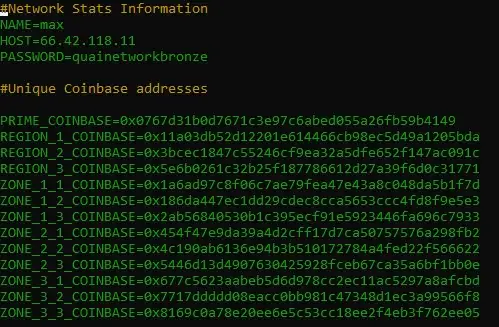
Within the network.env file, edit the default Coinbase addresses to the personal Bronze Age addresses you generated in the previous steps.
Once you have changed these, use ctrl+O and hit enter to save. Then use ctrl+x to return to the go-quai directory. Now, once you start your miner, any mining rewards will be outputted to the addresses you have created!
Step 6: enable account unlock for transactions
Before we can send a transaction in the console, we have to be able to unlock our account. This requires us to briefly hop in the Makefile to enable account unlocking.
Use the following command to enter the Makefile
nano Makefile
Once inside the Makefile, use your arrow keys to navigate down until you see the following line:
BASE_COMMAND = ./build/bin/quai --$(NETWORK) --syncmode full
In order to enable account unlocking, we have to add one thing to the end of this line. After the edit, your line should read as follows:
BASE_COMMAND = ./build/bin/quai --$(NETWORK) --syncmode full --allow-insecure-unlock

Step 7: Send transactions
Once you’ve completed the previous steps and gotten your hands on some Quai (whether from mining or otherwise) you’re ready to send a transaction.
Start by entering the JavaScript Console for the address in which you wish to send Quai from. Once you’re there, start by checking your balance to make sure you can cover the transaction:
eth.getBalance("INSERT_ADDRESS_HERE")
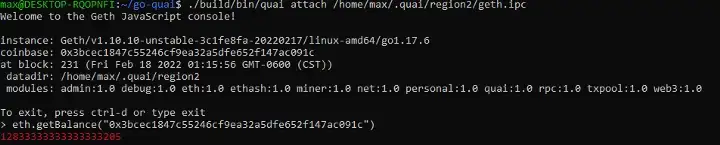
To send a transaction, you need to first unlock the account. To do this, use the following command:
personal.unlockAccount("INSERT_ADDRESS_HERE")
You will be prompted to enter your passphrase.
Once you have unlocked the account, you can prepare to send your transaction. First, define your “tx” variable using the following, replacing the parts of the command that are unique to you:
var tx = {from: "INSERT_YOUR_ADDRESS_HERE", to: "INSERT_RECIPIENT_ADDRESS_HERE", value: web3.toWei(INSERT_VALUE_HERE, "ether")}
After preparing the tx variable, you can send your transaction. Use the following command to send the transaction with the tx variable you prepared before.
personal.sendTransaction(tx, "INSERT_YOUR_PASSPHRASE")
This should execute the transaction on the blockchain.
Each transaction an individual sends during the Bronze Age Testnet will reward them with 1 Mainnet Quai.
Now that you have learned how to create addresses and send transactions on Quai Network, feel free to proceed to the How to Set Up and Maintain Your Bronze Age Quai Miner article to get your miner up and running.
Thank you for your interest in this Testnet. As a reminder, we fully expect things to break and not work — you can find support in our Discord server.
Join us to build a better blockchain.
Quai Network is an open-source Proof-of-Entropy-Minima blockchain network utilizing the capabilities of merged mining to increase throughput and security. Users of Quai Network will enjoy fast transaction times without compromising decentralization and security. Miners will have competitive mining opportunities across the many blockchains within the network.
Capable of thousands of transactions per second, the Quai Network is a new solution to scalability that is soon to be ready for mainnet release.
Terms & Conditions / Disclaimer
The entirety of the Quai Genesis grants program, including the content of this article, is subject to the Terms and Conditions outlined here.
Opinions, ideas, and statements shared in this update are delivered with numerous assumptions, risks, and uncertainties which are subject to change over time. There are multiple risk factors, including those related to blockchain, cryptographic systems, and technologies generally, as well Quai’s business, operations and results of operations, that could cause actual results or developments anticipated not to be realized or, even if substantially realized, to fail to achieve any or all of the benefits that could be expected therefrom. We reserve the right to unilaterally, completely, or partially change plans, expectations, and intentions stated herein at any time and for any reason, in our sole and absolute discretion, and we undertake no obligation to update publicly or revise any forward-looking statement, whether as a result of new information, future developments, or otherwise. ACCORDINGLY, WE RECOMMEND THAT YOU DO NOT RELY ON, AND DO NOT MAKE ANY FINANCIAL DECISION OR INVESTMENT BASED ON, THE STATEMENTS CONTAINED IN THIS UPDATE OR ANY OF OUR UPDATES/ARTICLES — INCLUDING BUT NOT LIMITED TO ANY SELLING OR TRADING OF QUAI TOKENS, ETHER, OR ANY OTHER CRYPTOGRAPHIC OR BLOCKCHAIN TOKEN, OR THE SECURITIES OF ANY COMPANY.
The views, opinions, and statements made in this update are those of an individual author and not those of any institution, University, or legal entity operating within the jurisdiction of The United States or beyond. There is no association between these views, opinions, and statements and any for-profit or non-profit entity, particularly with Universities, Foundations, and other Agencies located within the United States. Any perception of such an association is purely accidental, and will be rectified immediately if brought to our attention by the reader.